Important Update: We have ended our relationship with Venice. For a powerful all-in-one AI image and video creation tool, we recommend Dzine.
(Affiliate link)
Warning: Certain pieces of the following content are for mature (18+) audiences only. Viewer discretion is advised. By viewing this content, you are claiming that you are an adult and will use this page’s information responsibly and ethically.
Note: This post was updated in March 2026 to reflect verified features and changes that were introduced since the initial publish date.
If you’ve ever tried creating uncensored AI-generated images, you’ve probably hit the wall. You know the one. The “Sorry, your prompt violates our stupid guidelines” wall. Frustrating, right? Whether it’s Midjourney, ChatGPT, Nano Banana, or something else, most AI image tools have a brick wall that cannot be taken down.
Venice AI offers fewer restrictions than pretty much any mainstream AI tool, and you’ll see proof of that further down the post with images and prompts to try for yourself. Venice is a tool designed for uncensored, unrestricted, and private AI image generation (amongst other things), generally speaking. We’ll get to the asterisks involved in that statement later in the article, so hang around.
Venice has a free and paid version (Venice Pro). Let’s get this out of the way first, though: the free version does not include uncensored (NSFW) image generation. So if that’s what you want, get Venice Pro.
Prefer listening? Tune into the podcast version below.
Let’s take a closer look at what makes Venice AI a serious player in the world of AI images and art.
The Biggest Two Things That Set Venice Apart
Venice is marketed as private and uncensored. The platform doesn’t play by the same overly cautious rules as most others. In my experience, you can express your creativity freely without fear of prompt censorship.
Plus, Venice prioritizes your privacy. Unlike some tools that store your prompts (creepy), Venice states that prompts and model responses are not stored on its servers and that chat history is kept in local browser storage. However, the company still collects some basic, non-user-identifiable technical, account, and usage metadata.
So, it’s just you, your creativity, and an AI ready to bring your ideas to life.
The Uncensored Open Source AI Image Models Behind Venice
Venice’s image generator leverages some of the best open-source AI image models out there: Z-Image Turbo, Chroma, Flux 2, HiDream, Qwen Image, and more. If you’ve ever been wowed by open-source AI-generated art, there’s a chance these models were behind it.
Also, Venice now offers pay-per-use access to mainstream closed-source AI image models as well, including Nano Banana Pro, Nano Banana 2, Grok Imagine, Seadream, GPT Image, and more. Their selection of open-and-closed-source models changes over time, but this is part of the model lineup as of March 2026.
Important: Most AI image models in Venice are NOT uncensored.
Here ARE the uncensored ones, as of the time of this post update:
-Z-Image Turbo
-Lustify SDXL
-Lustify v7
-Anime (WAI)
-Chrome
Because I know what you’re probably looking to do here, you’ll most likely want to stick with Lustify.
Also, if you thought about this for over a second, you might think: “Wait… open-source models are free. So you’re saying Venice is charging people to use open-source tech?” Technically, yes. But also no. Venice is way more than just an open-source model wrapper. It makes using the best open-source tech easy to use, fast, and highly customizable on any device.
Setting The Right Settings for Your AI Images
Venice is more than a prompt bar and a model picker. It also includes features that let you tweak your creations:
- Aspect Ratios: Choose the perfect proportions for your masterpiece. If this weren’t included, it would be very bad!
- Automatically Enhance Prompt: Need some help writing your AI image prompt to create your AI image? Venice added a feature that enhances your prompt for you automatically.
- Adherence (CFG Scale): Control how closely the image sticks to your prompt. I like to adjust this to the highest setting. Don’t be intimidated by the name of the setting. I promise it’s not as scary as your disgusting habitat. It’s just a simple bar slider that you can adjust and experiment with.
- LoRA Strength: Refine styles with precision. I haven’t bothered experimenting with this yet. Maybe if I get bored enough. Probably not, though.
- High-Res/Upscaling (Venice Pro): Increase the resolution of your favorite images and print them for the walls of your house, condo, or trailer. You can also download whatever image you want directly to your device.
- Hide Venice Watermark (Venice Pro): Because who wants a watermark on their image? Pro users can remove it.
- Disable the Mature Filter (Venice Pro): Turn this off to enable NSFW and uncensored image generation. I was able to produce most of the images in this post by disabling this feature.
These advanced settings offer the kind of customization you’d expect from a paid tool, but Venice makes it accessible to everyone.
Here’s an example of the Automatically Enhance Prompt feature. It turns a short, lame prompt into a long, solid one in one click.

The feature turns this prompt…
“An image of a dude holding a beer”
Into this prompt…
“Photorealistic cinematic shot of a rugged, bearded man with tanned skin and salt-and-pepper stubble, wearing a worn-out navy blue flannel shirt with rolled-up sleeves, gripping a frosty amber beer bottle with condensation droplets on the glass, leaning casually against a weathered wooden fence post at sunset, golden hour lighting casting long dramatic shadows across his face, intense eye contact with the viewer, rustic outdoor background with tall dry grass and a dirt road, shallow depth of field, high-resolution photography style.”
Although Venice has a lot of nice settings, it’s of course not at the same level as Midjourney. That’s still the gold standard, in our opinion, and probably will be for some time. Midjourney offers infinite customizability to the point that it’s starting to encroach on Photoshop’s turf.
Image Style Presets in Venice
Let’s talk about style presets in Venice. It’s a nice tool for anyone who doesn’t want to master AI art prompting. Whether you’re aiming for a gritty GTA aesthetic, a bold Comic Book look, or terrifying Horror imagery, presets make it easy to achieve your vision. There is no learning curve, and I know how much my audience doesn’t like learning things. Just pick one of the 77 style presets, and create your image.

Be sure to mark your favorites with the heart icon like me (as shown above).
I wouldn’t be surprised if Midjourney copies this feature. However, they do have something comparable called “SREF” tags. It’s not as user-friendly, though.
Six Awesome Examples of Uncensored AI Images Generated with Venice
Here are some examples of uncensored AI images I generated, along with the prompts used. I even included the open-source image model and image preset – because I’m nice like that.
If you want to crank things up and get your Venice experience extremely unfiltered, then check out our full guide on how to make Venice as uncensored as possible.
It took some time to get some of these right since Venice takes more trial and error than Midjourney. But the wait was worth it because I knew the whole time that these images would make you smile. Let me know which one was your favorite in the comments section.
Some of these are NSFW.
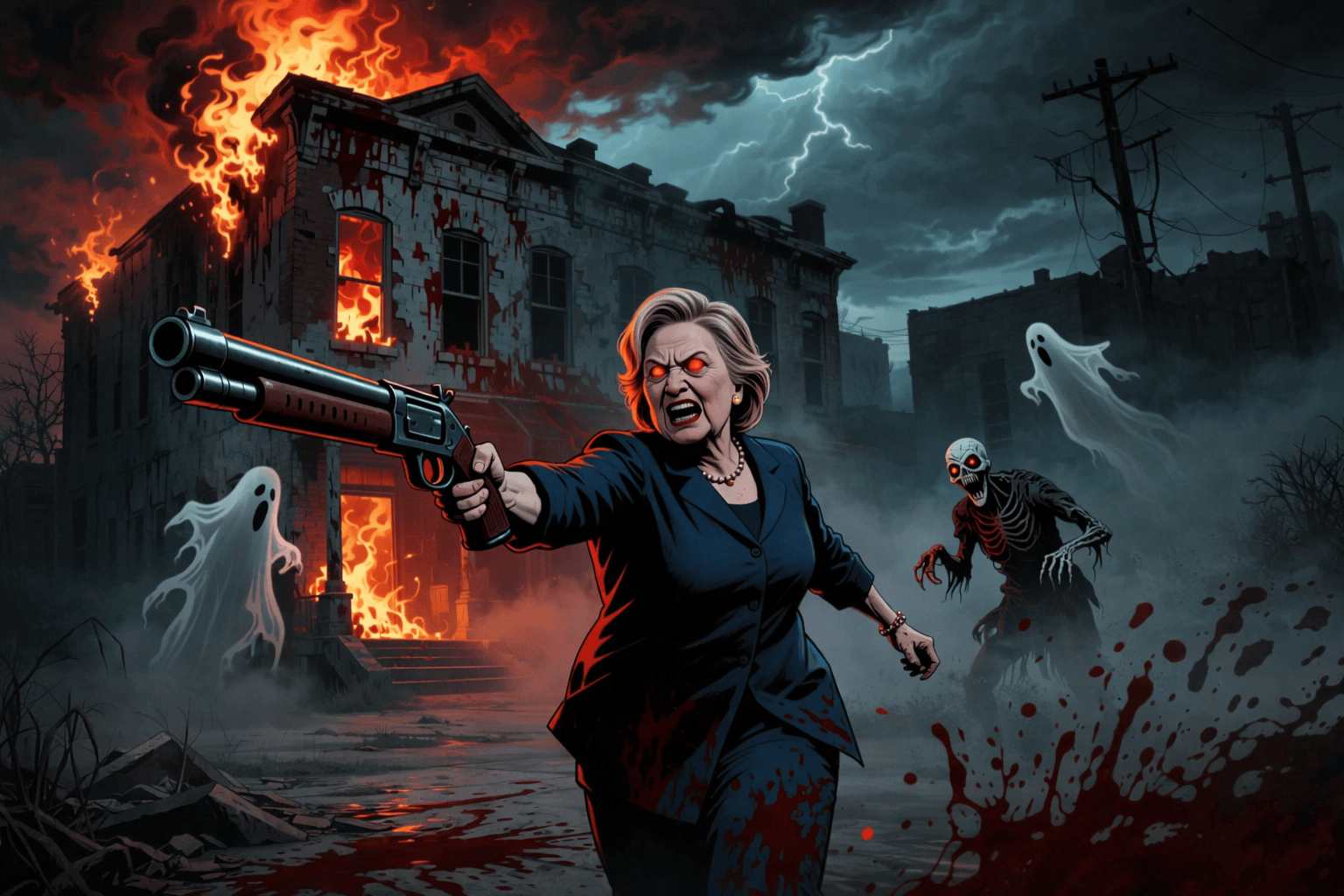
1. Hillary Clinton Wearing Her Sunday Best – Qwen Image (Horror Setting)

Highly detailed illustration of Hilary Clinton storming into an old, decaying burning building in Detroit with a giant shotgun in her hand, looking angry, red eyesBlood? Check. Hilary Clinton looking charming as she storms through a burning building with a giant shotgun? Also, check.
Word of warning before we get too far: Run The Prompts is not Democratic or Republican. We just don’t like most politicians. We also like freedom of expression and freedom of speech. That’s where Venice comes in. We’re also into satire, comedy, and messing with people. A lot of these images are jokes.
Check out Dzine now as a powerful alternative tool for AI image and video creation.
2. Resident Evil-Style Survival Horror Concept Video Game – Venice SD35 (Horror Setting)

Intense survival horror video game screenshot of a rugged male protagonist in his late 20s, wearing a tattered tactical vest and grime-streaked combat fatigues, standing amidst the rubble of a ruined Detroit city street at twilight. He is mid-action, firing a massive, oversized machine gun with a muzzle flash illuminating his determined face and sweat-dampened skin. The opposing army consists of hordes of zombie-like enemies with glowing eyes shuffling through the fog, while debris and shattered glass scatter across the cracked pavement. Cinematic lighting with deep shadows, volumetric fog, and a low-angle shot emphasizing the scale of the destruction and the intensity of the battle.Are we looking at a new way to create cool video game concept art? With uncensored image generation, elements like blood and gore (as seen above) are not off-limits.
3. GTA 6 Donald Trump as a Drug Dealer in LA – Z-Image Pro (GTA Setting)

Cinematic modern GTA 6 video game shot capturing Donald Trump as a gritty Los Angeles gang member, dressed in a worn black hoodie with the hood up and a thick gold rope chain draped over his chest, standing on a cracked urban sidewalk surrounded by scattered piles of cash and plastic bags of white powder, with a tense atmosphere and blurred silhouettes of other gang members leaning against cars in the background, harsh natural sunlight reflecting off the pavement, high detail.In Midjourney, many political figures are blocked. In my tests with Venice, that wasn’t the case.
4. Rocket Man Graffiti – Z-Image Turbo (Graffiti Setting)

Vibrant street art mural of a graffiti portrait of Kim Jong Un painted on the side of a massive, imposing skyscraper in Pyongyang, North Korea, featuring bold acrylic colors with striking red and black contrasts, thick spray-paint strokes creating a dynamic texture, his stern expression captured with sharp lines and intense eyes, background blurred to show the surrounding city skyline with hints of communist architecture, bright midday sunlight illuminating the vibrant colors, high-resolution digital art style.Speaking of political figures, here is the most diabolical one of them all: Rocket Man.
5. Michelle Obama AKA “Big Mike” Wearing a Revealing T-Shirt – Qwen Image (Watercolor Setting)

Michelle Obama AKA "Big Mike" wearing a white t-shirt with black letters that says "I have a penis", warm and welcoming look on her face, gray backgroundHave you heard the rumors?
6. A Brave Soldier Fights in a Future War – HiDream (Neon Punk Setting)

A soldier fires his gun into the opposing army during a war in the year 2600Just add violence? Venice is fine with it. I was impressed with the lighting effects I got out of this Neon Punk image setting.
In case you’re wondering (because many of you are), the answer is yes: you can create explicit sexual images in Venice Pro (the paid version), if that’s actually what you want to do. This is the tip of the iceberg. If you want to create hardcore images, it can do that as well.
The Hard Line: What “Uncensored” and “Any Image” Really Mean
Let’s be 100% clear. When we say Venice is “uncensored” and can create “any image,” we’re talking about freedom from the prudish, woke, corporate-approved filters that block everything from artistic violence to adult themes. It’s an AI that treats you like an adult and respects artistic intent.
This absolutely does not mean it’s a law-free zone.
Venice’s terms prohibit, among other things, sexualized depictions of minors, defamation, privacy violations, fraud, harassment, and other harmful or unlawful uses. An “uncensored” tool is for creative freedom within the bounds of the law, not for committing crimes.
Don’t be a fool. Stick to legal, consensual adult content and themes, dark humor, and artistic violence.
Wrapping It Up – Is Venice the Uncensored AI Art King?
Venice AI isn’t going to dethrone Midjourney anytime soon in terms of raw image quality or customizability. Midjourney is still the gold standard for AI art in 2026, in our opinion.
However, Venice’s advanced settings and uncensored capabilities (which include NSFW and sexual content) make it a powerful alternative, in our opinion. Yes, you’ll encounter more trial and error, but the creative freedom and privacy are awesome.
Venice isn’t perfect, but it’s a great choice for those who value freedom, privacy, and advanced customization. And with its uncensored approach, Venice is helping to pave the way for a more open and creative AI art ecosystem.
What did you think of Venice’s AI image generator? Let me know in the comments section below.
Prefer watching? Watch the YouTube version of this post below. Also, be sure to subscribe to us on YouTube. You won’t regret it.
Disclaimer & Boundaries: This article is for educational and entertainment purposes, exploring what’s possible with AI tools. You are 100% responsible for your actions and must obey all laws—especially those concerning age, consent, and likeness. Creating illegal content is strictly forbidden. We do not condone it, and we are not liable for the consequences if you choose to break the rules. Use these tools responsibly.

19 comments
It’s not uncensored.
Yes it is. If you’re looking to create NSFW/sexually explicit images, specifically, you would need to upgrade to Venice Pro. Pretty much anything else can be generated with the free version. Use this guide, and you’ll see exactly how to use Venice the correct way to make it as uncensored as possible: https://runtheprompts.com/resources/venice-ai-info/how-to-make-venice-ai-as-uncensored-as-possible/
If you can’t run it locally offline, you can’t sell it to me.
Sounds like an open source model running on your machine would fit your needs. Everybody is different. You can run DeepSeek for free locally using this tutorial (keep in mind you need a fairly powerful computer): https://runtheprompts.com/resources/deepseek-info/how-to-run-deepseek-r1-locally-using-lmstudio/
Thank you
Do you know if you can use Venice.ai to edit and refine either previously generated images or images from other sources? I am having trouble working out how to do either.
Hi Tozzer, at the moment, that is not possible with Venice. Thank you for running the prompts with us!
UPDATE: This is now possible in Venice! You can upload an image from any source and edit it with AI, all within Venice. This article shows you how to do it: https://runtheprompts.com/resources/venice-ai-info/hot-new-features-image-editing-social-feed-and-auto-mode/
This tool is awesome! I’m glad I found it.
We’re glad you like it. We agree!
Im going in, pro version will give a review soon, 10/12/25
Sounds good, let me know what you think.
I have Pro. Whenever i say something like … a sign with letters that say “The fox runs” … it almost NEVER gets the letters correct. It might produce something like “t fox rns” or even throw in symbols, not letters. I have tried this too … a sign with letters that say ((“The fox runs”)) … to emphasize. Aside from setting Adherence to 9 (which still doesn’t work), what else can i do?
I recommend experimenting with different image models in Venice. I was able to get it to work on the first try with Qwen Image with the Pop Art setting (the pop art setting is irrelevant to the solution, this is just an example). I used the prompt: A sign with letters that say “The fox runs”.
https://runtheprompts.com/wp-content/uploads/2025/11/the-fox-runs.png
nigga
What an intellectually stimulating comment.
Hi Nick,
Question; I do product development and write my own Provisional Patent Applications for intellectual property.
Can Venice be used to generate realistic 3D designs (like GPT) and also help structure patent application details, yet have it all kept strictly confidential so it doesn’t become public knowledge or become visible or known in the public domain?
I would need to have it help generate 3D realistic renderings based on my detailed prompts and structure IP.
If this is capable through the paid app, I would have no problem with that.
Thanks for any feedback and info!
Hi Aund, thanks for running the prompts with us. I tried an image prompt in Venice of what you’re describing (I think). Here is the result. I don’t know if this is what you’re looking for, but let me know. In terms of privacy, Venice states that they do not store user prompts.
https://runtheprompts.com/wp-content/uploads/2026/02/venice-ai-image-generation-headphones.png
I probably wouldn’t use this because there’s not really any uncensored content I’d wish to create, but I will say the “Big Mike” and rocket man are pretty hilarious and edgy.
I’m glad you liked it, thanks! And thanks for running the prompts with us.