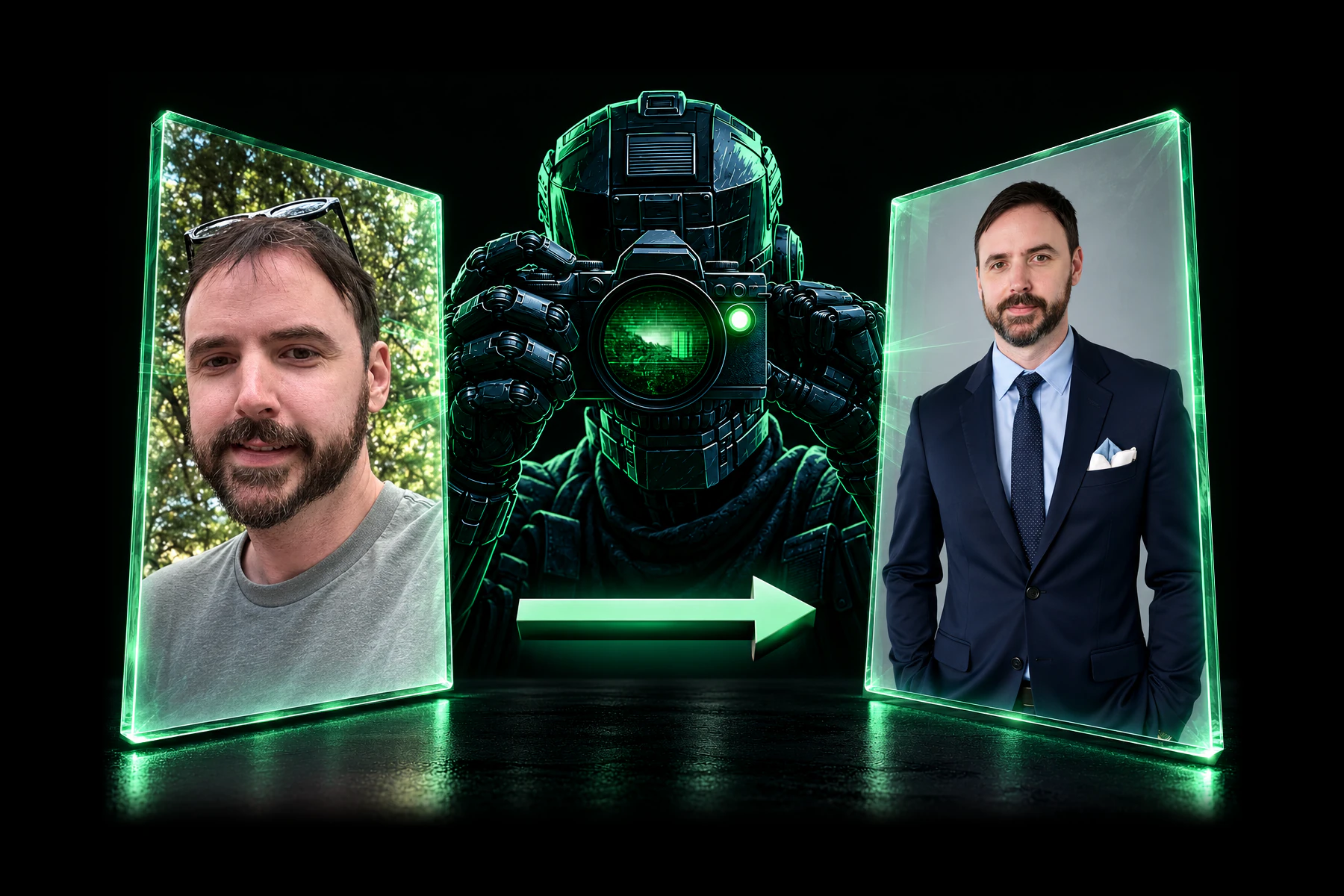
I sent my mother an AI-generated photo of myself that I created with Aragon AI, and she thought it was real.

That’s a pretty good start for an AI headshot generator. If the woman who raised you doesn’t notice anything suspicious, the software has done something right.
But convincing your mother is one thing. Putting together a product that’s awesome enough to spend money on is another.
Naturally, I’m kind of a cheapskate. Frugal, I guess, would be more accurate. Spending $200-$250 on a dumb photoshoot sounds like the perfect combination of hell to me. So, generating AI headshots at a fraction of the price is highly appealing to me, and probably to you, too.
So, I spent time using Aragon AI to generate headshots, try photo packs, edit images, and make a video of myself. I found a lot of photos I would use. There were others that I would not.
In this Aragon AI review, I’ll cover the results, the features I tried, what annoyed me, and the pricing distinction I wish I’d understood before getting started.
Let’s party with Aragon.
First, Understand Aragon AI’s Two Separate Purchases
The first thing you need to know is that Aragon’s dedicated headshot packages and its broader subscription are two separate purchases, and one does not include the other.
During my testing, the Aragon subscription did not give me access to the dedicated headshot package I expected. That had its own paywall (which I then got through without paying, because Run The Prompts is a special affiliate snowflake).
The two options serve different needs:
- Headshot packages: For people who want a batch of professional-looking headshot portraits, typically for LinkedIn, email signatures, business cards, personal branded websites, etc.
- The broader subscription: For people who want to generate AI photos of themselves (or anyone else) in various settings and use the platform’s other creative tools.
You can make headshot photos of yourself through the broader subscription, but that doesn’t make it the same purchase as the dedicated headshot package.
I can see why Aragon separates them. Someone who needs a LinkedIn photo might have no interest in generating videos, using AI outfit changing tools, or experimenting with image models.
Still, I found the distinction confusing. I wish it had been more obvious before I started clicking around. It took me like a half hour to figure this out, but now you don’t have to.
Were the AI Headshots from Aragon Actually Good?
Yes. I found a lot of photos that I liked enough to use in different places. Most of them looked shockingly similar to how I look in real life.
Here are just a few examples:
Before:


After:


That’s the result I care the most about. A huge batch of images means very little if I don’t want to use any of them.
The clothing stood out in particular. Aragon put me in convincing suits and dress shirts that I don’t own and have no interest in buying (because I’m cheap/frugal).
Of course, some generations were duds. That’s part of the experience, and you should expect to reject some photos. This is the worst one by far:

But I liked the majority of my results, which is funny because the opposite usually happens when someone takes real pictures of me.
Aragon managed to reverse that situation without requiring me to stand around while someone tells me to smile (because I’m not, apparently).
And then there was the mother test. The image I sent her looked convincing enough that she didn’t realize it was AI-generated.
That doesn’t mean every image will fool everyone (they won’t). It does tell you why I came away impressed with the results.
Reviewing Aragon AI’s Pricing
At the time of writing, Aragon’s public pricing page lists these individual headshot packages:
| Package | Listed price | Headshots | Clothing and background choices |
| Basic | $35.00 | 40 | One attire and one background |
| Standard | $45.00 | 60 | Two attires and two backgrounds |
| Executive | $75.00 | 100 | All available attires and backgrounds |
These are the headshot package prices, separate from the subscription. Promotions can change, so check Aragon’s pricing page before paying.
Here is the public pricing for the Aragon AI subscription packages:
| Subscription plan | Monthly billing | Annual billing (per month) | Monthly credits |
| Aragon Lite | $15.00 | $11.00 | 300 |
| Aragon Pro | $29.00 | $22.00 | 1,200 |
| Aragon Ultimate | $49.00 | $37.00 | 2,400 |
| Aragon Creator | $249.00 | $185.00 | 12,000 |
As everyone knows, paying full price sucks, and that’s why we struck a deal with Aragon to get you 15% off with promo code RUN15 through our special Aragon link. Use it while it still works.
How to Get Better Results with Aragon AI
The photos you upload give the AI something to work from. Choose them with some care, okay? Treat them right, and maybe you’ll get lucky.
Here’s what I’d recommend based on my experience.
1. Include a Smiling Photo if You Want Smiling Results
I didn’t give enough thought to this when selecting my reference photos.
If you want images of yourself smiling, include smiling reference images. Don’t upload a collection of serious expressions and then act shocked when the AI gives you more of them.
I made that mistake.
Thankfully, I was able to improve one result using the facial expression changer inside the AI Editor.
I selected the image, opened the tool, and changed the expression. You can use a preset or describe what you want.
2. Use Photos of Yourself That You Like
If you don’t like how you look in a particular photo, don’t make that photo a reference.
Choose images that represent how you want to appear, while still looking like you.
This won’t guarantee a great result, but it gives the tool a better starting point.
3. Choose Sharp, Well-Lit Images
Your face should be easy to see.
A decent photo from a modern phone is a reasonable starting point. Avoid blurry images, heavy shadows, and photos where your face barely occupies the frame.
Use different angles and framing where the upload instructions allow them.
4. Follow the Requirements for the Feature You’re Using
Aragon AI rejected some of my uploads, which got annoying.
To be fair, I hadn’t carefully read the requirements (at all…oops).
Read them first. Also, don’t assume the character creator and dedicated headshot tool accept the same number or type of reference photos. They behaved differently during my testing.
What Else Can You Do With Aragon AI?
Once I started exploring the subscription side of things, I found a much broader creative platform than I expected.
That helps answer an obvious question: after you generate the photos you need, why keep paying every month?
For headshots or just batches of AI images of yourself, you might not need to.
The subscription makes more sense if you regularly use the other tools. Here are some of them:
1. AI Photo Packs and Characters
Photo packs were one of my favorite parts of the broader studio.
They let you generate a collection of images with different clothes, backgrounds, and settings without building every shot from scratch.
Some packs were useful. Others were funny. A few looked like they were trying very hard to convince strangers that I lead a life of luxury. There’s even an AI dating photos pack, for anyone interested in doing that.
I also created two characters of myself using different reference photos. That gave me two versions to experiment with when generating packs. I recommend doing the same thing.

There was one limitation: the character creator only let me upload three reference images during my test.
I would have liked more. The dedicated headshot process accepted more references, so the difference was not appreciated.
2. AI Image Generation and Editing

You can also use the platform for images that have nothing to do with your disgusting face.
During my testing, I could generate images from prompts and edit photos uploaded from my computer.
That gives the subscription a purpose beyond repeatedly generating new pictures of yourself (you’re such a narcissist, aren’t you?).
The AI Editor also had a large selection of tools, organized into categories. I tested some and was impressed with several results, including the facial expression adjustment.
I haven’t tested every tool, though. There are far too many for me to pretend otherwise.
3. AI Fashion Studio

Fashion Studio lets you experiment with clothing and how it looks on your selected character.
The options I saw included tops, bottoms, shoes, poses, and scenes. I could also upload clothing images.
I can see this being useful if you enjoy trying different looks before buying anything.
I’d treat it as a visual experiment, though. A generated picture can show how an outfit might look. It can’t tell you how the fabric feels or whether the trousers will become your new enemy when you sit down.
4. AI Video Creation
Aragon also offers AI video generation, including creating clips from a photo and using guided presets.
I made an approximately 18-second video of myself with very little effort.
The result was pretty close.
Still, the resemblance was good enough to make the feature worth testing. I could also edit the preset prompts rather than being stuck with their original wording.
5. AI Audio, Locations, and Objects

Aragon also included audio features such as music, voice cloning, and sound effects.
I didn’t spend enough time testing those to offer a firm verdict.
I also found options for creating reusable locations and objects. Those seem more useful for custom image and video projects than for someone who simply wants a better profile photo.
You don’t need to explore every menu to get value from the tool. Start with the reason you signed up. Then, do the exploring. There’s a ton to see.
What I Didn’t Like About Aragon AI
The AI photos were really good and kept my attention, which is tough to do nowadays with AI tools. However, it wasn’t perfect. The interface sometimes tested my patience.
1. Too Many Upsells
This was my biggest complaint.
I kept running into banners, pop-ups, and offers asking me to spend more money.
Aragon, if you’re reading this, please give it a rest. Stop it.
One offer during each visit is understandable. Repeated offers become irritating, especially when I’m already trying to use the product.
2. Some AI Tools Felt Inconsistent
A large tool library sounds appealing until you find features that don’t work quite as smoothly as you expect.
In one try-on tool I tested, I couldn’t select an existing photo directly from my Aragon images.
The workaround was to download the photo and upload it again.
That’s an unnecessary chore when the image is already sitting inside the platform.
Other editing tools also didn’t always produce the change I wanted. The number of features is very impressive, but I’d like the experience to feel more consistent across all of them.
3. The Separate Headshot Paywall Was Confusing
I’ve already explained the purchase distinction, but it belongs in the drawbacks because it affected my experience.
I started with the wrong expectation about what the subscription included.
Before paying, decide whether you want the dedicated headshot package, the broader creative studio, or both.
4. I Couldn’t Find a Dark Mode
I looked for dark mode and couldn’t find it.
I prefer dark interfaces. A bright white screen personally makes my eyes hurt. But then again, I’m old.
This won’t bother everyone, but it bothered me.
Ethics: AI Photoshoots Raise a Question About Honesty
Realistic AI photos are useful. They also make it easier to mislead people.
A professional-looking portrait for LinkedIn (or whatever) is one use. Fabricating a life full of private jets, yachts, and luxury trips is another.
Some of the photo packs made me think about how easily someone could use these images to sell a lifestyle they don’t have.
Like this one… I’m so rich that I travel to Antarctica to do photoshoots with penguins. Not really, though.

Especially if that person happens to sell an expensive course about becoming rich.
I ran some of my images through an AI image checker, and it identified them as AI-generated. That was interesting, but one detector test doesn’t prove these photos will always be detected, especially just by using the human eye.
The same concern applies to AI video ads, which Aragon can also generate. I’d only use them when the presentation is transparent and all of the product claims are 100% accurate.
The Final Verdict: Is Aragon the Best AI Headshot Generator?
The one-sentence summary of this Aragon AI review is this: I recommend Aragon AI based on the headshots I received.
I can’t fairly declare it the best AI headshot generator in the world without comparing it against all of the other similar AI headshot generation tools.
What I can say is that it gave me multiple portraits I would use, convincing, awesome-looking clothes, and a likeness that passed my own mother’s inspection.
For someone who wants a LinkedIn photo, a website portrait, or a professional profile image, that makes the dedicated headshot package something that I think anyone looking to save $200+ in cash should consider.
The Aragon subscription needs a different decision.
If you regularly generate images, edit photos, make photo packs, or experiment with video, the broader subscription and AI studio features give you more reasons to return.
If you only need a few headshots and that’s it, I wouldn’t keep a subscription simply because there are lots of buttons left to click.
Wrapping Up This Aragon AI Review

Just one year ago, with the AI image tech the way it was way back then, this Aragon AI review would’ve been much different.
The technology has gotten so much better in such a short amount of time.
Aragon AI impressed me where I wanted it to: the hyper-realistic photos, the ease of use, and the time/money savings.
The repeated upsells, separate purchases, and awkward moments in some editing tools made the experience more frustrating than it needed to be.
My recommendation is straightforward. Consider the headshot package if you need professional-looking portraits. Consider the subscription if you’ll regularly use the wider image and video tools.
You can try Aragon AI here and enter RUN15 at checkout to get 15% off.
Have you tried Aragon or another AI headshot generator? Tell me how the results turned out in the comment section below. I’m interested in whether you got photos you wanted to use.
Until next time, remember to run the prompts and prompt the planet.
Disclaimer: We are affiliates of Aragon AI and may receive a commission from sales generated through our unique referral link at no additional cost to you. You agree to comply with all applicable laws, regulations, and standards, and to hold harmless the authors, publishers, and affiliates from any claims, damages, or losses arising from your actions.